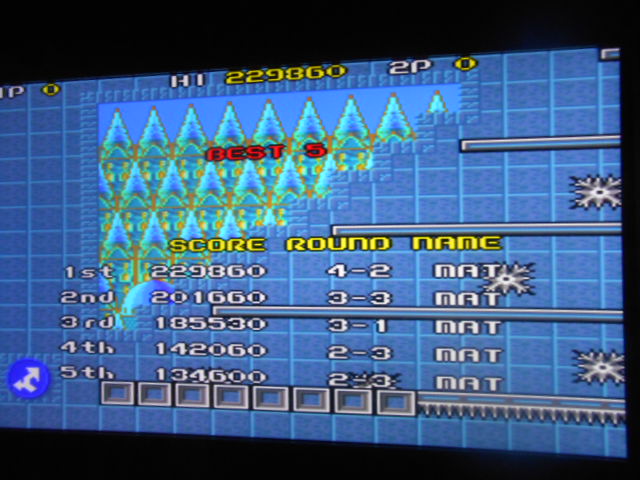
Achieved at : 2024-09-03
Rank : Not found
Lups : none
Approved :
No
Voting completed : 2024-09-04
| General Rules: |
Play with default settings unless otherwise specified. If the ROM set is not mentioned, play the parent ROM. No use of trainers, cheats, saved game files, emulator save states or other emulator advantages. No use of code modifications that give the player an advantage over other players. 1 player only. No continues. In-game/internal autofire is only allowed if a game has it (enabled through hard or soft DIPs). External/MAME/cheat-based autofire is not allowed. It is discouraged and may lead to voters not accepting your score to - excessively point farm - use glitches or other game exploits You can use any emulator you want (Retropie, rain, neo geo, Coinops, Antstream, handhelds,...). If specific emulators or versions are restricted, it will be mentioned in the Specific rules. For Top 3 we encourage (but NOT mandatory) to provide: a) A full video with DIP Switches to be shown in the video (at the start or at the end of your performance). If DIP Switches are not available, Service Menu should be used instead (at the start of your performance). If no difficulty settings is available on your game, you still have to show either DIP switches or service mode showing this (if not mentioned in the specific rules). OR b) An INP file. Please state your MAME version in the comments. And add an URL where the voter can download your .inp. (We currently have no way to store those files on the server, but it is on the roadmap). For INPs: o We encourage to also show the DIPs during your video play. o Delete NVRAM before recording/viewing. Many arcade games that MAME emulates save some information (like high scores) in non-volatile ram (NVRAM), which by default MAME saves in the nvram subfolder. For some games (not all) the RNG is affected by NVRAM, so an .inp file recorded with non-empty nvram won't replay correctly on anyone else's system. o To record INP file, you require Wolfmame: You can download it here : https://github.com/mahlemiut/wolfmame/releases (or on MARP). o Record one run gameplay when using INP. |
| Specific Rules: | Play the game in 1 player mode with default settings |
To vote or comment on this score, please
login.
@Matt Donaldson

Mantalow
you can access dipswitches in MAME with TAB key, which open a menu and then go to "dip switches", rom version and name can be obtained in the same tab menu, but going to "game infos" or "game version", it's also displayed at start, in a blue square if this hasn't been disabled in mame options.
recording on camera or via OBS studio software (or any otrher, I mention obs because it's free) is ok too, as long as you record entire gameplay.
or alternatively, you can submit an inp file, which you can record with wolfmame (only this version of mame is able to record and play these), upload the file somewhere and link the url of this file in the lvlup comments, mentionning which version of wolfmame you used to record (different versions are not compatible).
You can also jump on our discord and ask for details or infos if this is too much infos at once, we'll be happy to help you.
recording on camera or via OBS studio software (or any otrher, I mention obs because it's free) is ok too, as long as you record entire gameplay.
or alternatively, you can submit an inp file, which you can record with wolfmame (only this version of mame is able to record and play these), upload the file somewhere and link the url of this file in the lvlup comments, mentionning which version of wolfmame you used to record (different versions are not compatible).
You can also jump on our discord and ask for details or infos if this is too much infos at once, we'll be happy to help you.
@Mantalow 🇫🇷
Matt Donaldson
Im a bit of a Noob with the technical parts, I have an Arcade Machine running a PC that boots straight into MAME. Can you tell me the usual way to show dip switches etc? I will find my camera and record the entire playthrough for you.

GTi 🎱
Hi and welcome too.
Same message as below. Some video proof would be helpful.
Cheers 🍺
Same message as below. Some video proof would be helpful.
Cheers 🍺
Mantalow
First of all, welcome to lvlupscore but...
For first place, beating current highscore by 24% I would like to see:
- romset used
- dipswitches settings
- video of the entire run
Thanks
For first place, beating current highscore by 24% I would like to see:
- romset used
- dipswitches settings
- video of the entire run
Thanks
Deleted message